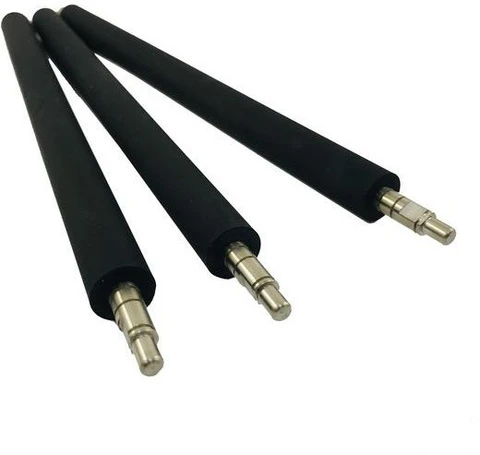
Developer Roller Compatible with Brother HL-L2300, HL-L2320D, HL-L2360DN, DCP-L2520D, DCP-L2541DW and MFC-L2701 Printers (Black Toner)
Share:
Developer Roller compatible with Brother HL-L2300D, HL-L2320D, HL-L2360DN, HL-L2365DW, DCP-L2520D, DCP-L2541DW, MFC-L2700D, and MFC-L2701DW printers. High-quality magnetic roller designed for smooth toner transfer and consistent print quality.
Developer Roller designed for compatibility with Brother laser printers and toner cartridges. This high-quality replacement developer roller, also known as a magnetic roller, plays a critical role in transferring toner evenly from the toner chamber to the OPC drum, ensuring sharp text, dark prints, and consistent print quality.
The developer roller is suitable for replacing worn, scratched, faded, damaged, or defective rollers that may cause light printing, uneven toner distribution, grey background, black lines, faded output, streaks, or poor print quality. Manufactured from durable materials for reliable compatibility and long service life, it helps restore cartridge performance and maintain professional printing results.
Designed for toner cartridge servicing, maintenance, refurbishment, rebuilding, and replacement applications, this developer roller provides smooth toner transfer and dependable operation.
Compatible Models:
Brother HL-L2300D, HL-L2305W, HL-L2320D, HL-L2340DW, HL-L2360DN, HL-L2361DN, HL-L2365DW, HL-L2366DW, HL-L2380DW
Brother DCP-L2500D, DCP-L2520D, DCP-L2540DW, DCP-L2541DW, DCP-L2680DW
Brother MFC-L2700D, MFC-L2701D, MFC-L2701DW Printers
Suitable for black toner cartridge applications and professional cartridge rebuilding.
Related products

- 5
- 10
- 20
- 50
- 100
Pressure Roller...


You may add any content here from XStore Control Panel->Sales booster->Request a quote->Ask a question notification
At sem a enim eu vulputate nullam convallis Iaculis vitae odio faucibus adipiscing urna.
Reviews
There are no reviews yet.